
CR09 刷卡设备
CR09 刷卡设备使用手册:涵盖产品特性、外观尺寸、商品参数、连接器、安装方法、配置指令与通信协议。
前言
感谢使用我司提供的 CR09 刷卡设备。认真阅读本文档,可以帮助您了解此设备功能、特点、以及快速掌握设备的使用、安装方法。
产品简介CR09 刷卡设备是专为门禁刷卡领域研发的一款产品,具备韦根\RS485 两种输出接口,支持韦根26/34协议切换。
产品特点1,支持韦根/RS485两种输出方式2,支持PSAM 卡验证3,86盒方式安装
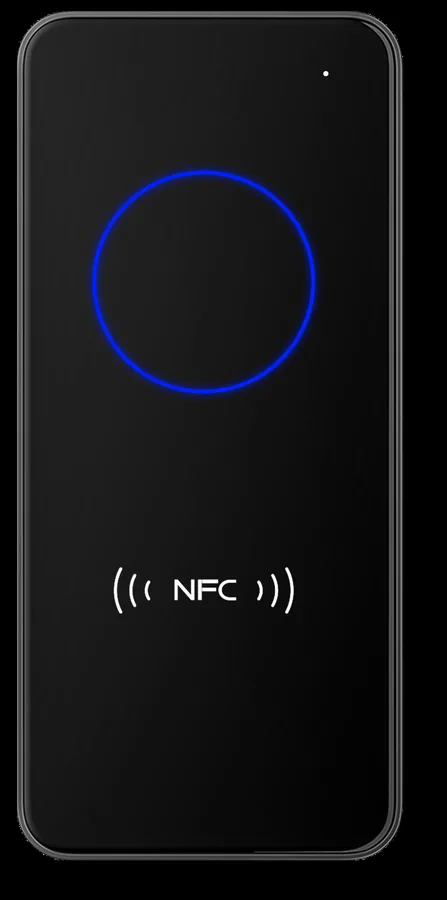
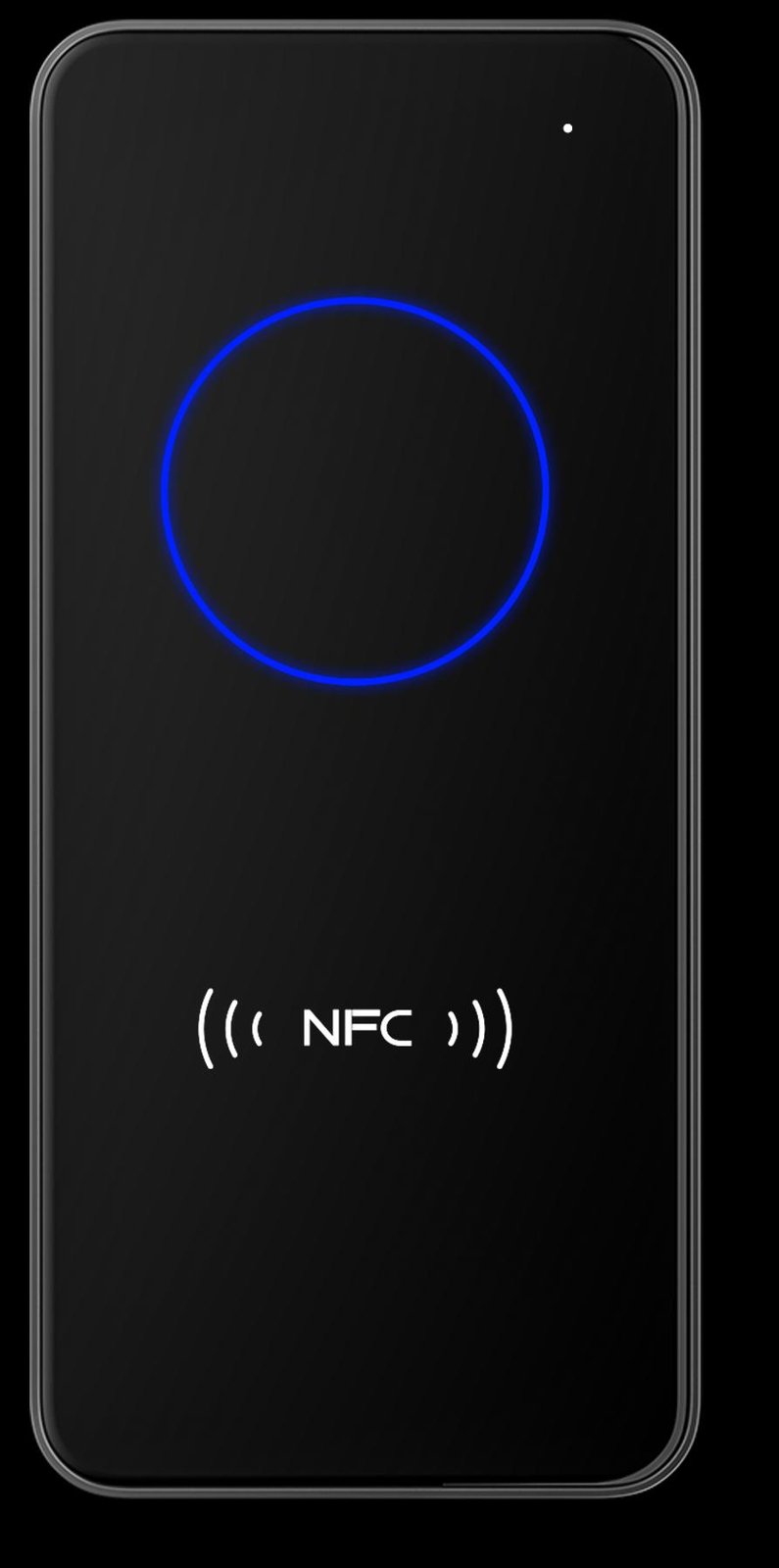
产品外观
外观图
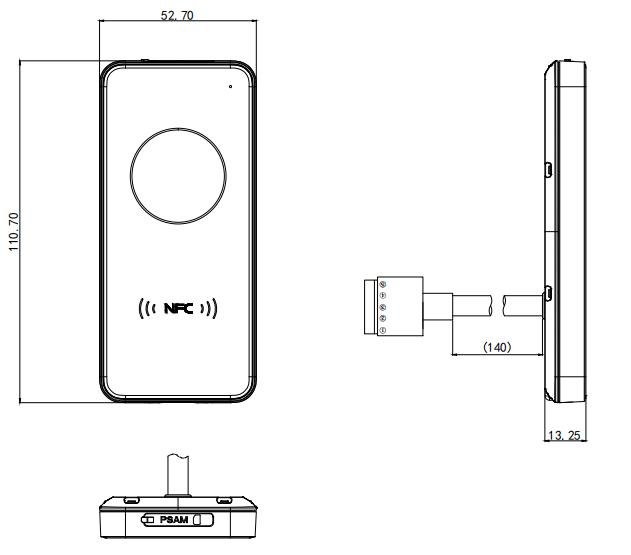
产品尺寸图
商品参数
常规参数常规参数支持接口 RS4
韦根指示方式 红光、绿光、白光,蓝灯,蜂鸣器安装方式 壁挂式安装产品尺寸 110.70mm52.70mm13.25mm
识读参数射频卡识读参数识别卡类型 ISO 14443A 协议卡、ISO 14443B协议卡、身份证(仅读取物理卡号)操作卡方式 读取UID/读写M1卡扇区/PSAM认证射频工作频率 13.56MHz识读有效距离 <5cm 实际距离与卡片规格有关
电气参数须在连接好设备之后,才允许提供电源输入。如果在线缆带电时接插或拔离设备(带电热插拨),将会损坏其电子部件,请确保在进行线缆插拨时已切断电源。不良的电源连接、或过短间隔的电源关闭开启操作、或过大的压降脉冲都可能导致设备不能处于稳定正常的工作状态,需保持电源输入的稳定。在关闭电源输入后,需间隔2 秒以上才可以再次开启电源输入。电气参数工作电压 DC 5V-15V工作电流 150mA(典型值 12V供电)额定功耗 1800mW(典型值5V供电)
工作环境工作环境参数静电防护 ±15kV(空气放电),±6kV(接触放电)工作温度 -20°C-70°C存储温度 -20°C-80°C相对湿度 5%-95%(无凝结)
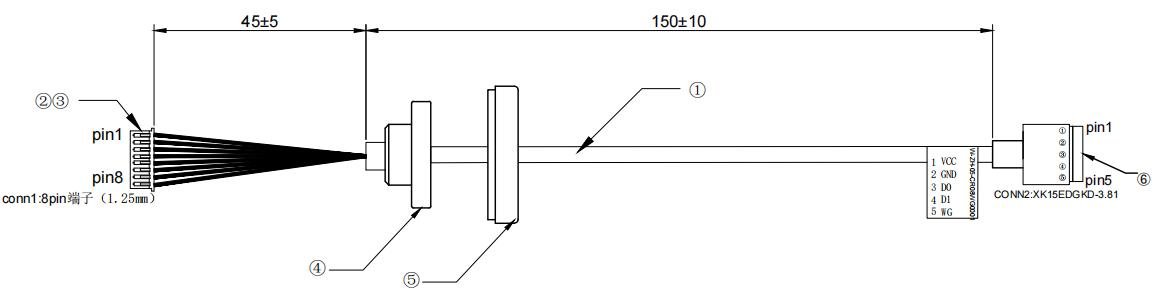
连接器
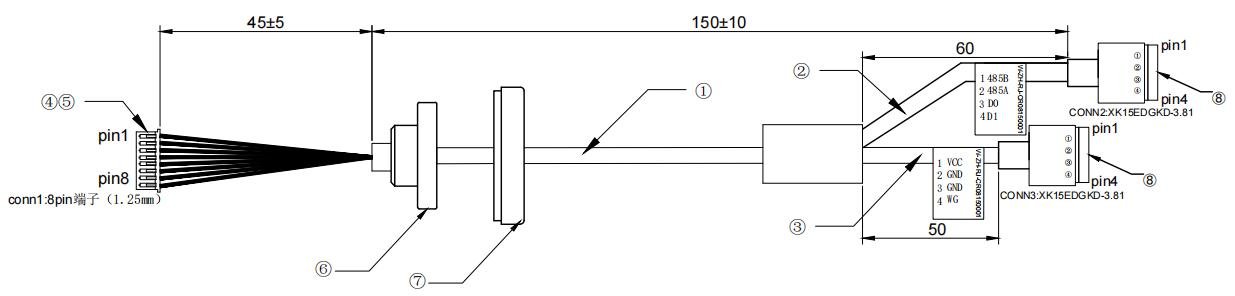
韦根连接器4.2. 485 连接器
韦根+485 连接器
引脚说明引脚定义 引脚说明VCC 电源正极GND 电源地D0 韦根0D1 韦根1485A 485A线485B 485B线WG 韦根协议设置引脚悬空:韦根26低电平:韦根34
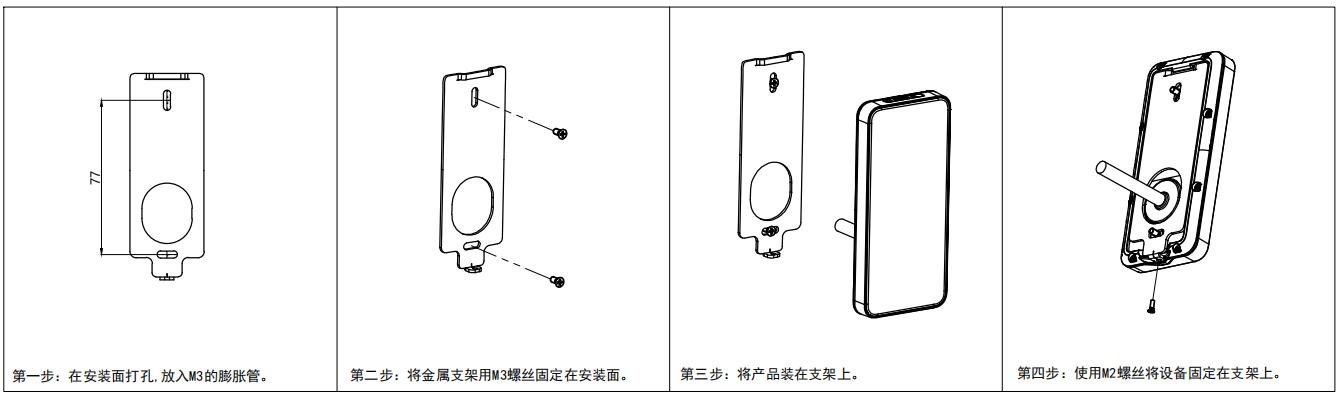
安装方法
射频卡识读天线位于面板下侧,在安装时应避免10cm 以内无金属和磁性物质,否则会严重降低刷卡性能。
配置指令
数据传输协议
请求数据格式命令头+ 命令字 + 标识字 + 长度字+ 数据域+ 校验字命令头:两字节,默认为0x55,0xAA,可更改命令字:一字节长度字:两字节,指明本条命令从长度字后面开始到校验字的字节数(不含效验字),低位在前数据域:此项可以为空(数据域内容可参考6.2表格编写)校验字:一字节,从命令头到数据域最后一字节的逐字节异或值
应答数据格式命令头+ 命令字 + 标识字 + 长度字+ 数据域+ 校验字命令头:两字节,默认为0x55,0xAA命令字:一字节标识字:一字节, 0x00则代表成功应答,其它失败或错误长度字:两字节,指明本条命令从长度字后面开始到校验字的字节数(不含效验字),低位在前数据域:此项可以为空校验字:一字节,从命令头到数据域最后一字节的逐字节异或值
配置项说明表格自上而下,即为配置项内容排序,即:指令类型、波特率(默认 115200-8-n-1)、设备号(默认为 1)、灯光配置(包括背光灯、刷卡动作灯)、其他配置、修改包头、前缀、后缀、命令模式获取间隔、输出配置。配置项 数据长度 说明指令类型 1 字节 0x00:获取设备配置;0x01:按照指令内容重新配置设备波特率 4 字节 波特率 115200 → 00 01 C2 00设备号 4 字节 设备号(目前不生效)灯光配置 1 字节背光灯 刷卡动作灯7 6 5 4 3 2 1 0蓝 绿 红 白 蓝 绿 红 白其他配置 1 字节Bit7 Bit6 Bit5 Bit4 Bit3 Bit2 Bit1 Bit0区分卡类型0x01:主动上报卡号0x00:命令模式空 继电器 蜂鸣器更改包头 2 字节 包头(默认是 0x55 0xaa)注意:如果修改包头,那以后发送的所有协议,都需要使用修改后的包头前缀 3 字节字节 1 字节 2 字节 3有效长度 前缀 1 前缀 2后缀 3 字节字节 1 字节 2 字节 3有效长度 后缀 1 后缀 2命令模式获取间隔时间 1 字节 单位 25 毫秒输出配置 1 字节Bit 7 Bit 6 Bit 5 Bit 4置 0 以协议模式输出卡号 输出卡号Bit 3 Bit 2 Bit 1 Bit 0反序输出 字符串输出 十进制输出 十六进制 hex输出Bit 7 Bit6 必须置 0;Bit 5 以通信协议格式输出卡号,参考通信协议说明;Bit 4 只上传卡号数据;Bit 2 ~ Bit0 有且仅有一个可以置 1,其他必须置 0;
配置指令示例
重新配置设备设置内容如下:指令类型 重新配置设备: 01波特率 115200: 00 01 C2 00设备号 1: 00 00 00 01灯光配置 (背光灯)蓝灯常亮,(刷卡动作)闪绿灯: 84其他配置 刷卡响蜂鸣器 主动上报卡号 不区分类型: 41包头 0x55 0xaa: 55 AA无前后缀: 00 00 00 00 00 00命令模式获取间隔 2秒: 50输出配置 输出卡号(非协议模式) 以十六进制hex输出(正序): 11PC->Reader:55 AA B0 15 00 01 00 01 C2 00 00 00 00 01 84 41 55 AA 00 00 00 00 00 00 50 11 E2(数据长度为 21,十六进制位 0x15,长度字为两个字节,低位在前,则为 15 00)Reader->PC:55 AA B0 00 00 00 4F (第四字节 00代表设置成功,其他值代表失败)
获取设备配置PC->Reader:55 AA B0 01 00 00 4E(当指令类型为 00时,数据长度只有 1,所以长度字为 01 00)Reader->PC:55 AA B0 00 15 00 01 00 01 C2 00 00 00 00 01 84 41 55 AA 00 00 00 00 00 00 50 11 E2(第四字节 00代表获取成功,其他值代表失败)
通信协议
数据传输协议
请求数据格式命令头+ 命令字 + 标识字 + 长度字+ 数据域+ 校验字命令头:两字节,默认为0x55,0xAA命令字:一字节长度字:两字节,指明本条命令从长度字后面开始到校验字的字节数(不含效验字),低位在前数据域:此项可以为空校验字:一字节,从命令头到数据域最后一字节的逐字节异或值
应答数据格式命令头+ 命令字 + 标识字 + 长度字+ 数据域+ 校验字命令头:两字节,默认为0x55,0xAA命令字:一字节标识字:一字节, 0x00则代表成功应答,其它失败或错误长度字:两字节,指明本条命令从长度字后面开始到校验字的字节数(不含效验字),低位在前数据域:此项可以为空校验字:一字节,从命令头到数据域最后一字节的逐字节异或值
协议模式下卡号上报格式
不区分卡类型指令0x30获取结果不区分数据来源例:命令模式下上位机轮询发送该指令获取数据PC-->Reader :55 AA 30 00 00 CFReader-->PC :55 AA 30 00 00 00 CF 无数据Reader-->PC :55 AA 30 00 08 00 37 36 64 30 33 34 39 31 9D 反馈数据指令: 0x30 上位机端主动轮询或设备端主动上报结果使用此指令说明: 此指令返回的数据不区分卡类型PC->Reader(Send) Reader->PC(Receive)项目 字节 说明 项目 字节 说明包头 2Byte Default: 0x55 0xAA 包头 1Byte Default: 0x55 0xAA命令字 1Byte 0x30 命令字 1Byte 0x30数据域长度 2Byte 0x00 0x00 标识字 1Byte 0x00 : 成功非 0 : 失败数据域 0 Byte 没有此项 数据域长度 2Byte N数据域 N Byte 数据 N = 0 时没有此项校验字 1Byte 校验字 1Byte
区分卡类型指令0x33获取结果区分卡类型例:例:命令模式下上位机轮询发送该指令获取数据(蓝色--卡类型,红色--数据)PC-->Reader :55 AA 33 00 00 CCReader-->PC :55 AA 33 00 00 00 CC 无数据Reader-->PC :55 AA 33 00 09 00 40 37 64 39 30 64 61 36 31 DD 刷卡数据指令: 0x33 上位机端主动轮询或设备端主动上报结果使用此指令说明: 此指令返回的数据区分卡类型PC->Reader(Send) Reader->PC(Receive)项目 字节 说明 项目 字节 说明包头 2Byte Default: 0x55 0xAA 包头 1Byte Default: 0x55 0xAA命令字 1Byte 0x33 命令字 1Byte 0x33数据域长度 2Byte 0x00 0x00 标识字 1Byte 0x00 : 成功非 0 : 失败数据域 0 Byte 没有此项数据域长度 2 Byte 数据 N = 0 时没有此项数据域N Byte(数据 N = 0时没有此项)数据区分标志 1 Byte 0x40: NFC卡结果 X Byte 结果校验字 1Byte 校验字 1Byte
指令 0x01设备状态查询例:PC-->Reader :55 AA 01 00 00 FEReader-->PC :55 AA 01 00 02 00 55 AA 0
指令 0x02获取设备 ID例:PC-->Reader :55 AA 02 00 00 FDReader-->PC :55 AA 02 00 04 00 80 00 00 00 79红色部分代表设备ID, 低位在前,80000000 代表设备id 为 128指令: 0x01说明:标识字 00 表示设备正常;非 0 不正常PC->Reader(Send) Reader->PC(Receive)项目 字节 说明 项目 字节 说明包头 2Byte Default: 0x55 0xAA 包头 1Byte Default: 0x55 0xAA命令字 1Byte 0x01 命令字 1Byte 0x01数据域长度 2Byte 0x00 0x00 标识字 1Byte 0x00 : 成功; 非0 : 失败数据域 0Byte无此项 数据域长度 2Byte N数据域 N Byte 数据 N = 0时没有此项校验字 1Byte 校验字 1Byte指令: 0x02说明:第六章设置指令设置的IDPC->Reader(Send) Reader->PC(Receive)项目 字节 说明 项目 字节 说明包头 2Byte Default: 0x55 0xAA 包头 1Byte Default: 0x55 0xAA命令字 1Byte 0x02 命令字 1Byte 0x02数据域长度 2Byte 0x00 0x00 标识字 1Byte 0x00 : 成功;非0 : 失败数据域 0Byte无此项 数据域长度 2Byte N数据域 N Byte N > 0 设备ID, 低位在前校验字 1Byte 校验字 1Byte
指令 0x04 蜂鸣器和 LED 控制例:每次闪亮 0x5050ms(十进制80)间隔 0x0A50 ms(十进制10)55 AA 04 05 00 02 03 50 0A 00 A5 控制红灯闪亮三次,时间4 秒,间隔0.5s55 AA 04 05 00 08 03 50 0A 00 AF 蜂鸣器响三次,时间4秒,间隔0.5s55 AA 04 05 00 04 03 50 0A 00 A3 控制绿灯闪亮 三次,时间4 秒,间隔0.5s55 AA 04 05 00 0A 03 50 0A 00 AD 红灯蜂鸣器动作,时间4 秒,间隔0.5s55 AA 04 05 00 0C 03 50 0A 00 AB 绿灯 蜂鸣器动作,时间4秒,间隔0.5s55 AA 04 05 00 06 03 50 0A 00 A1 红绿闪三次,时间4 秒,间隔0.5s55 AA 04 05 00 0E 03 50 0A 00 A9 红绿灯蜂鸣器动作三次,时间4 秒,间隔0.5s55 AA 04 05 00 18 03 50 0A 00 BF 蓝灯蜂鸣器动作三次,时间4秒,间隔0.5s指令: 0x04说明:确认设备有相应颜色的灯PC->Reader(Send) Reader->PC(Receive)项目 字节 说明 项目 字节 说明包头 2Byte Default: 0x55 0xAA 包头 1Byte Default: 0x55 0xAA命令字 1Byte 0x04 命令字 1Byte 0x04数据域长度 2Byte 0x05 0x00 标识字 1Byte 0x00 : 成功非0 : 失败数据域 5Byte1 Byte 开关:0关闭,1 使能bit0: 保留bit1: 红灯控制位bit2: 绿灯控制位bit3: 蜂鸣器控制位bit4: 蓝灯控制位数据域长度 2Byte N1 Byte 次数数据域 NByte 数据 N = 0 时没有此项1 Byte 每次持续时间(单位50MS)1 Byte 每次间隔时间(单位50MS)1 Byte 保留校验字 1Byte 校验字 1Byte
NFC 模块操作NFC模块可支持Mifare One卡块读写、CPU 卡发送APDU指令,详见具体指令。名词解释:任务启动标志位--该标志位用于告知扫码器何时开始卡的操作,何时结束卡的操作,或告知扫码器操作卡的指令是独立的,无指令间依赖关系。该标志位用来设置卡片的操作环境,标志位的值有以下三种:0x00->AUTO 告知扫码器该指令可单独执行,无指令间的依赖关系。0x01->START 告知扫码器开始对卡操作或对卡操作尚未结束,且指令间可能存在依赖关系。0x02->FINISH 告知扫码器本条指令是操作卡的最后一条指令,将卡片操作环境恢复到默态。若操作卡的指令是独立的,如读写M1卡的某块数据,则该标志位即可设置为AUTO也可设置为FINISH。
若使用START标识开始操作卡片,则必须使用FINISH标识结束操作,否则会导致NFC模块工作异常,需重启后才可再次使用。
若卡片操作过程中涉及多条卡片操作指令,则过程中所发指令的任务启动标志位均为 START,最后一条指令标记为FINISH。
指令 0X53 卡号上报开关指令: 0x53说明:数据域的值设置为 0x01 或0x00 时(即进入或退出命令模式),均为空操作且扫描器回复成功。目的用于兼容 v2.10 版本通讯协议注:默认卡号上报功能开启,若关闭卡号上报功能,则协议工作在任何模式下均得不到卡号。此时扫码器多用于直接读写 M1 卡或操作 CPU 卡,而无需得到卡号。PC->Reader(Send) Reader->PC(Receive)项目 字节 说明 项目 字节 说明包头 2Byte Default: 0x55 0xAA 包头 1Byte Default: 0x55 0xAA命令字 1Byte 0x53 命令字 1Byte 0x53数据域长度 2 Byte 0x01 0x00 标识字 1Byte 0x00 : 成功非0 : 失败数据域 1 Byte0x01:模块进入命令模式0x00:模块退出命令模式0x02:刷卡上报0x03:关闭上报数据域长度 2 Byte N数据域 N Byte 数据 N = 0时没有此项校验字 1 Byte 校验字 1 Byte 例:PC-->Reader :55 AA 53 01 00 02 AF 使能卡号上报PC-->Reader :55 AA 53 01 00 03 AE 关闭卡号上报Reader-->PC :55 AA 53 00 00 00 AC
读 M1 卡一块数据例:用A(0x60)密钥做认证,读取6 扇区第二块(即绝对块号为 0x19)数据。认证密钥为FF FF FF FF FF FF,标志位选配。PC-->Reader :55 AA 51 09 00 60 19 FF FF FF FF FF FF 00 DE 包含标志位PC-->Reader :55 AA 51 08 00 60 19 FF FF FF FF FF FF DF 无标志位Reader-->PC :55 AA 51 00 10 00 12 34 56 78 90 12 34 56 78 90 12 34 56 78 90 12 34 读卡成功Reader-->PC :55 AA 51 FF 00 00 51 失败或无卡指令: 0x51 读取 M1卡某块说明: 任务启动标志字段可选,当指令中不包含该标志位时,默认按 AUTO标识执行PC->Reader(Send) Reader->PC(Receive)项目 字节 说明 项目 字节 说明包头 2Byte Default: 0x55 0xAA 包头 1Byte Default: 0x55 0xAA命令字 1Byte 0x51 命令字 1Byte 0x51数据域长度 2 Byte N 标识字 1Byte 0x00 : 成功非 0 : 失败数据域 N Byte密钥类型 1Byte 0x60 -> KEY A0x61 -> KEY B 数据域长度 2 Byte N块号 1 Byte 0 ~ 0xFF密钥 6 Byte数据域 N Byte 数据 N = 0 时没有此项任务启动标志位(可选) 1 Byte0x00 -> AUTO0x01 -> START0x02 -> FINISH校验字 1 Byte 校验字 1Byte
写 M1 卡一块数据例:用B(0x61)密钥做认证,向6扇区第二块(即绝对块号为0x19)写数据。认证密钥为FF FF FF FF FF FF,标志位选配。PC-->Reader :55 AA 52 19 00 61 19 FF FF FF FF FF FF 11 11 11 11 11 11 11 11 22 22 22 22 22 22 22 22 00CC 包含标志位PC-->Reader :55 AA 52 18 00 61 19 FF FF FF FF FF FF 12 34 56 78 90 12 34 56 12 34 56 78 90 12 34 56CD无标志位Reader-->PC :55 AA 52 00 00 00 AD写数据成功Reader-->PC :55 AA 52 FF 00 00 52 失败或无卡指令: 0x52 向 M1 卡某块写数据说明: 任务启动标志字段可选,当指令中不包含该标志位时,默认按 AUTO 标识执行PC->Reader(Send) Reader->PC(Receive)项目 字节 说明 项目 字节 说明包头 2 Byte Default: 0x55 0xAA 包头 1Byte Default: 0x55 0xAA命令字 1 Byte 0x52 命令字 1Byte 0x52数据域长度 2 Byte N 标识字 1Byte 0x00 : 成功非 0 : 失败数据域 N Byte密钥类型 1 Byte 0x60 -> KEY A0x61 -> KEY B 数据域长度 2Byte N块号 1 Byte 0 ~ 0xFF密钥 6 Byte数据域 NByte 数据 N = 0 时没有此项数据 16 Byte任 务 标 志 位(可选) 1 Byte0x00 -> AUTO0x01 -> START0X02 -> FINISH校验字 1 Byte 校验字 1Byte
读 M1 卡扇区内多个块例:用A(0x60)密钥做认证,读取2 扇区0 块、1 块、2块数据,即以 0块为基地址连续读3块。认证密钥为FF FF FF FF FF FF,标志位设置为 AUTO。PC-->Reader :55 AA A0 0B 00 00 60 02 00 03 FF FF FF FF FF FF 35Reader-->PC :55 AA A0 00 30 00 00 00 00 00 00 00 00 00 00 00 00 00 00 00 00 00 00 00 00 00 00 00 00 0000 00 00 00 00 00 00 00 00 00 00 00 00 00 00 00 00 00 00 00 00 00 00 00 6F 读数据成功Reader-->PC :55 AA A0 FF 00 00 A0 失败或无卡指令: 0xA0 读 M1 卡扇区内多个块说明: 可读 S50/S70 卡,扇区号、偏移、块数的取值根据卡片类型而定偏移--以选取的扇区 0 块为起始地址计算待读块的基地址。块数--以选定的基地址块为读卡开始块,连续读取选中的块数。命令解析:读取一张卡的 2 扇区 1 块和 2 块数据55 AA A0 0B 00 00 60 02 01 02 FF FF FF FF FF FF 3555 AA A0 0B 00 00 60 02 01 02 FF ~FF 35命令头 指令 数据长度 AUTO 密钥类型 扇区号 待读块基地址 从基地址开始连续读几块 密钥 校验字注:读取的块数不可为 0,若为 0视为无效指令;一条指令中不可跨扇区读取块数据PC->Reader(Send) Reader->PC(Receive)项目 字节 说明 项目 字节 说明包头 2Byte Default: 0x55 0xAA 包头 1Byte Default: 0x55 0xAA命令字 1Byte 0xA0 命令字 1Byte 0x51数据域长度 2Byte N 标识字 1Byte 0x00 : 成功;非 0 : 失败数据域 11 Byte任务标志位 1 Byte0x00 -> AUTO0x01 -> START0x02 -> FINISH数据域长度 2Byte N密钥类型 1 Byte 0x60 -> KEY A0x61 -> KEY B扇区号 1 Byte S50 -> 0x00~0x0FS70 -> 0x00~0x27偏移 1 Byte S50 -> 0x00~0x03S70 -> 0x00~0x03 或 0x00~0x0F数据域 NByte 数据 N = 0 时没有此项块数 1Byte S50 -> 0x01~0x04S70 -> 0x01~0x04或 0x01~0x10密钥 6 Byte校验字 1Byte 校验字 1Byte
写 M1 卡扇区内多个块指令: 0xA1 写多块数据说明: 可读 S50/S70 卡,扇区号、偏移、块数的取值根据卡片类型而定偏移--以选取的扇区 0 块为起始地址计算待写块的基地址。块数--以选定的基地址块为写卡开始块,连续写数据到选中的块数。命令解析:写数据到一张卡的 2 扇区 1 块和 2 块(指令详见示例)55 AA A1 2B 00 00 60 02 01 02 FF FF FF FF FF FF ... ... 36注:待写入的块数不可为 0,若为 0 视为无效指令;一条指令中不可跨扇区写入数据55 AA A1 2B 00 00 60 02 01 02 FF ~FF ... ... 36命令头 指令 数据长度 AUTO 密钥类型 扇区号 待写块基地址 从基地址开始连续写几块 密钥 待写数据 检验字PC->Reader(Send) Reader->PC(Receive)项目 字节 说明 项目 字节 说明包头 2 Byte Default: 0x55 0xAA 包头 1 Byte Default: 0x55 0xAA命令字 1 Byte 0xA1 命令字 1 Byte 0xA1数据域长度 2 Byte N 标识字 1 Byte 0x00:成功;非 0:失败数据域 N Byte任务标志位 1 Byte0x00 -> AUTO0x01 -> START0X02 -> FINISH 数 据 域 长度 2 Byte N密钥类型 1 Byte 0x60 -> KEY A0x61 -> KEY B扇区号 1 Byte S50 -> 0x00~0x0FS70 -> 0x00~0x27偏移 1 Byte S50 -> 0x00~0x03S70 -> 0x00~0x03 或 0x00~0x0F数据域 0 Byte 数据 N = 0 时没有此项块数 1Byte S50 -> 0x01~0x04S70 -> 0x01~0x04 或 0x01~0x10密钥 6 Byte数据 N Byte N = 16 * 块数校验字 1 Byte 校验字 1 Byte 例:用A(0x60)密钥做认证,向2扇区1块、2 块写入数据,即以1 块为基地址连续写2 块。认证密钥为FF FF FF FF FF FF,标志位设置为 AUTO。PC-->Reader :55 AA A1 2B 00 00 60 02 01 02 FF FF FF FF FF FF 11 11 11 11 11 11 11 11 11 00 00 00 00 0000 00 00 00 00 00 00 00 00 33 33 33 33 33 33 33 33 33 36例2:55 AA A1 2B 00 00 60 02 01 02 FF FF FF FF FF FF 44 44 44 44 44 44 44 44 44 55 55 55 55 55 55 55 55 5555 55 55 55 55 66 66 66 66 66 66 66 66 66 36Reader-->PC : 55 AA A1 00 00 00 5E 写数据成功Reader-->PC :55 AA A1 FF 00 00 A1失败或无卡
指令 0XA6 发送 APDU 指令例:红色字体部分为APDU 指令选择应用目录:PC-->Reader :55 AA A6 08 00 01 00 A4 00 00 02 3F 01 C8Reader-->PC : 55 AA A6 00 11 00 6F 0D 84 05 41 44 46 30 31 A5 04 9F 08 01 02 90 00 4C指令: 0xA6说明: 用于与CPU 卡之间进行通信,APDU 指令可参见《FMCOS2.0 用户手册》PC->Reader(Send) Reader->PC(Receive)项目 字节 说明 项目 字节 说明包头 2 Byte Default: 0x55 0xAA 包头 1 Byte Default: 0x55 0xAA命令字 1 Byte 0xA6 命令字 1 Byte 0xA6数据域长度 2 Byte N 标识字 1 Byte 0x00 : 成功非 0 : 失败数据域 N Byte任务标志位 1 Byte 0x01 -> START0X02 -> FINISH 数据域长度 2 Byte NAPDU DATA N Byte 符合 ISO7816-4 的数据结构 数据域 N Byte 数据 N = 0 时没有此项校验字 1 Byte 校验字 1 Byte 获取4 位随机数:Reader-->PC : 55 AA A6 06 00 01 00 84 00 00 04 DEReader-->PC :55 AA A6 00 06 00 7C C9 56 38 90 00 14外部认证:四位随机数用于外部认证,认证方式为DES 单倍长,默认密钥(1122334455667788)PC-->Reader :55 AA A6 0E 00 01 00 82 00 00 08 71 7E B1 7D 4C F6 81 17 33Reader-->PC : 55 AA A6 00 02 00 90 00 CB选择二进制文件:PC-->Reader :55 AA A6 06 00 02 00 B0 83 00 00 6EReader-->PC : 55 AA A6 00 12 00 11 22 33 44 55 66 77 88 00 00 00 00 00 00 00 00 90 00 53
Video Tutorials
CR09 产品演示
Watch videoFAQ
How can I get the latest firmware for this product?
Firmware and upgrade packages require submitting your company information for approval; once approved, a download link will be sent. You can also upgrade online from the device backend.
The manual does not match the actual device?
Always refer to the device nameplate label and the latest version of the manual. If you have questions, contact Koodle technical support for assistance.